A reader for global tech news and AI research

ShenzhenDubaiLagosNairobiBengaluruBerlinSao Paulo

Discover globaltech news

TECHROVE is a reader for finding news and research papers on AI, mobile development, Swift/Kotlin, gadgets, companies and businesses from various countries. Foreign language headings are now in the language selected on your device.You can narrow down the articles you want to read by combining countries, regions, and fields.

Cavemen.jp Co., Ltd.This is a news reader developed by .

No account registration required. iPhone/iPad and Android versions are free to start (advertisements and in-app purchases included).About fees

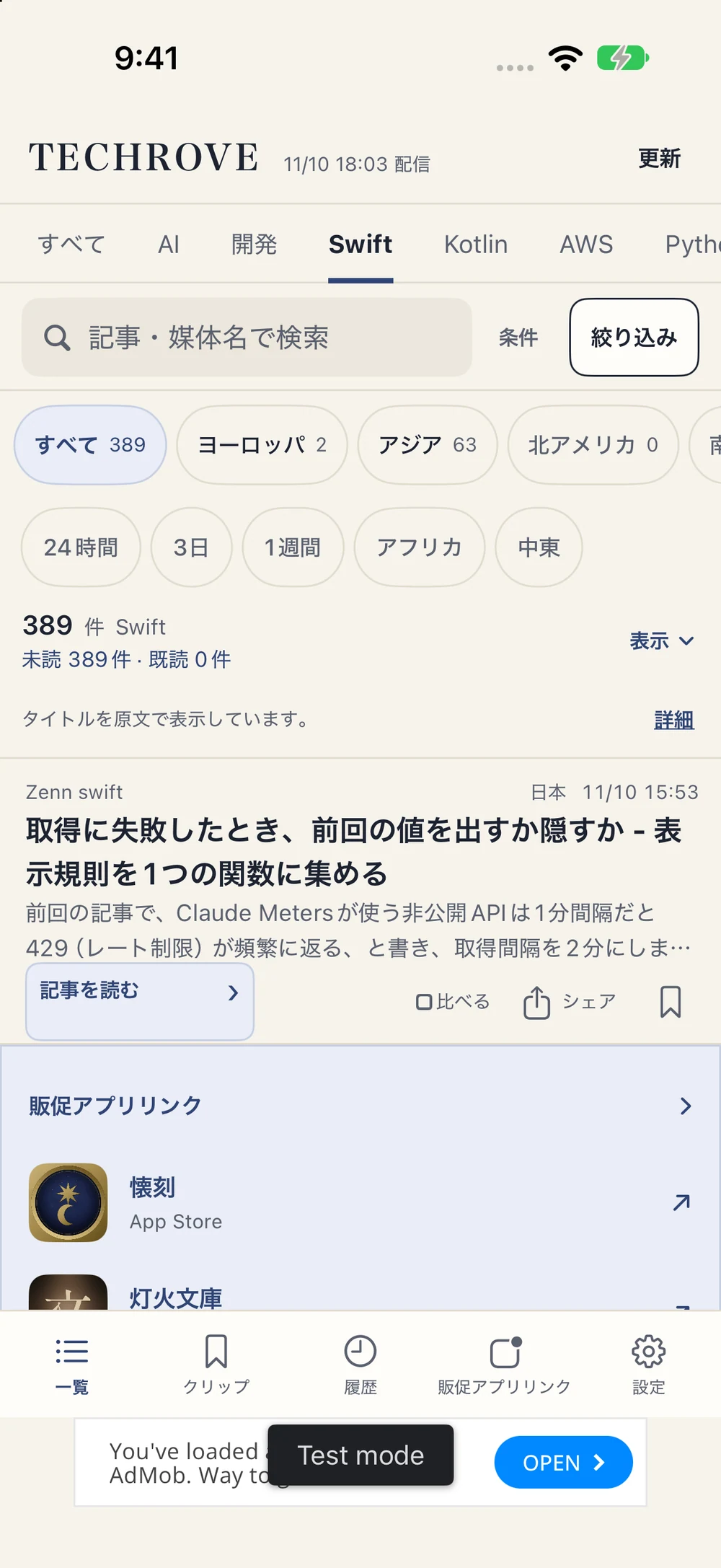
The TECHROVE iPhone article list, with search, category, region and date controls.
Screens captured from a development build. Articles and counts change over time. The interface shown is Japanese.

Your usual themes,
Look at it from another country.

Some days I'm looking for development tips, and some days I'm curious about overseas services.Combining countries and fields changes the information entry point.

I want to know about AI in China and the Middle East

In addition to announcements from English-speaking countries, you can also pay attention to technical information published in Chinese and Arabic. You can get a grasp of the content from the headings in your chosen language and trace the source of the article you are interested in.

Example of filtering

Asia×AI
Overseas knowledge for app development

Search for tips on mobile development and technical articles on Swift and Kotlin.You can find unusual sources by adding local conditions to your usual keywords.

Example of filtering

Europe×Mobile development

Following technology and business together

What kind of services and businesses are new technologies leading to?You can search for articles on corporate trends and startups in various regions and use them as clues for your research.

Example of filtering

Middle East×Business
Try the interactive sample

12 itemsSampleNewest

    Saved 0issueTap the star to clip

    This is a screen image. All headings and media are fictitious samples and are not actual articles. The display changes when you select a field tab or region.

    See how it works, on real screens.

    Explore the layouts for iPhone, Duo and Mac. Tap an image to view it at full size.

    The TECHROVE iPhone article list, with search, category, region and date controls.

    iPhone: find your next article

    View larger image

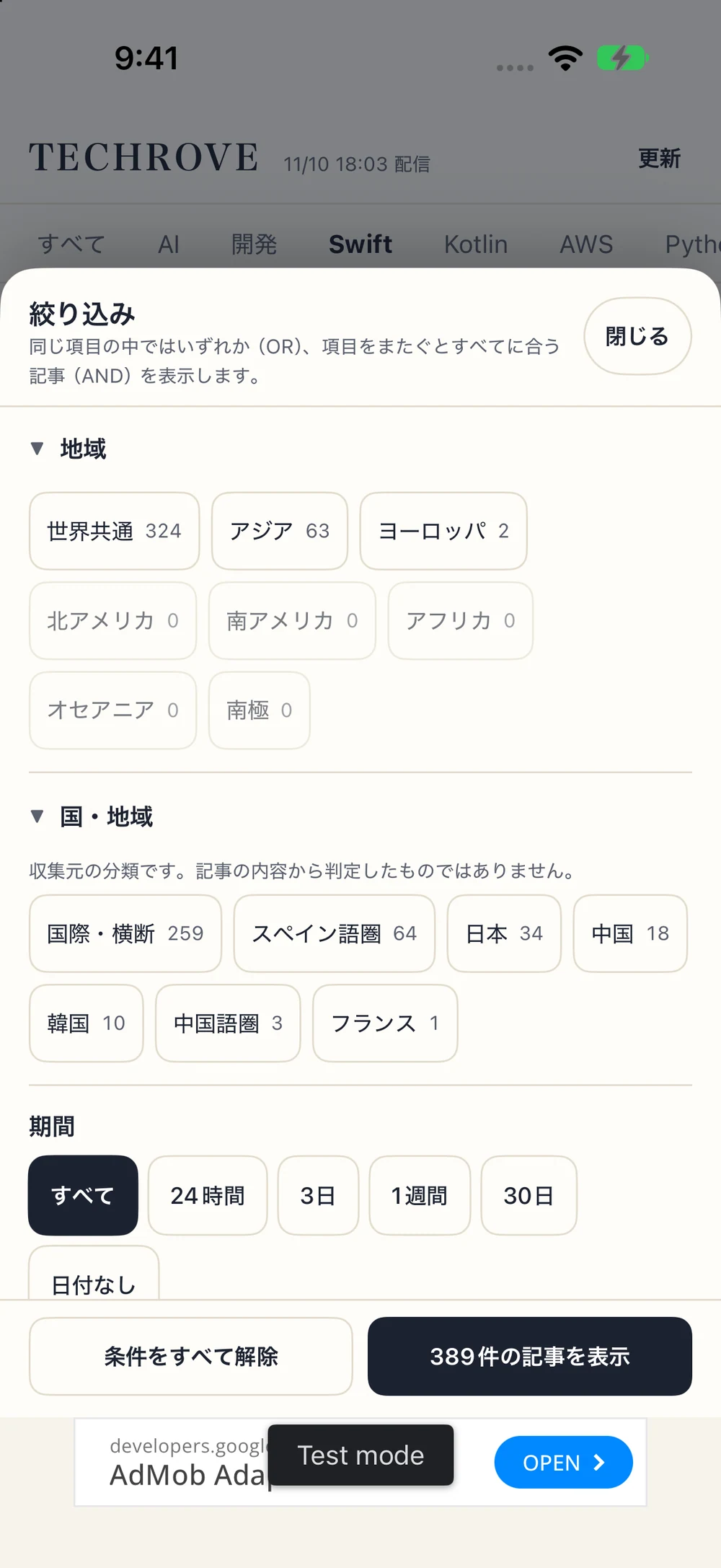
    TECHROVE filters combining country, region, topic and collection date.

    Combine country, topic and date filters

    View larger image

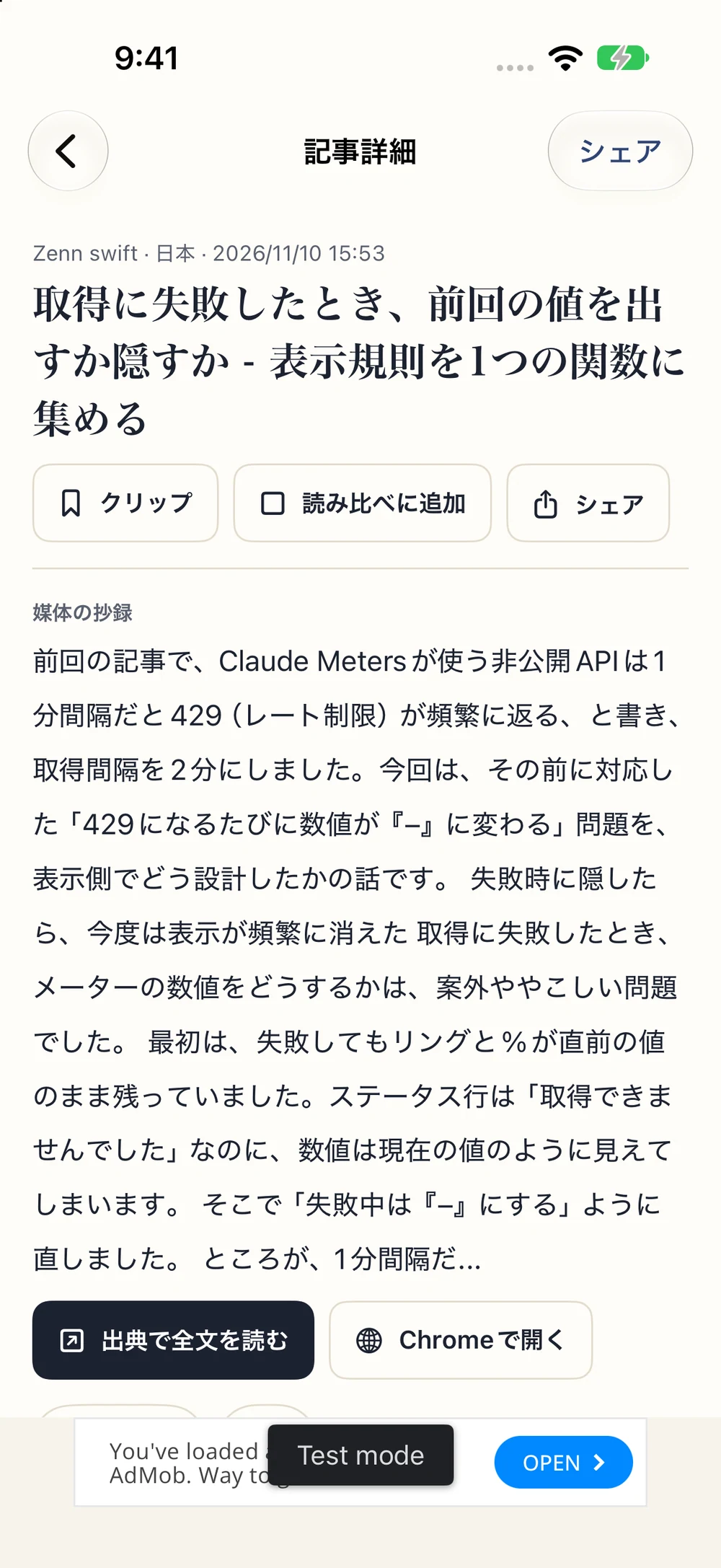
    A TECHROVE article detail showing the title, publisher summary and source link.

    The title, summary and source in one place

    View larger image

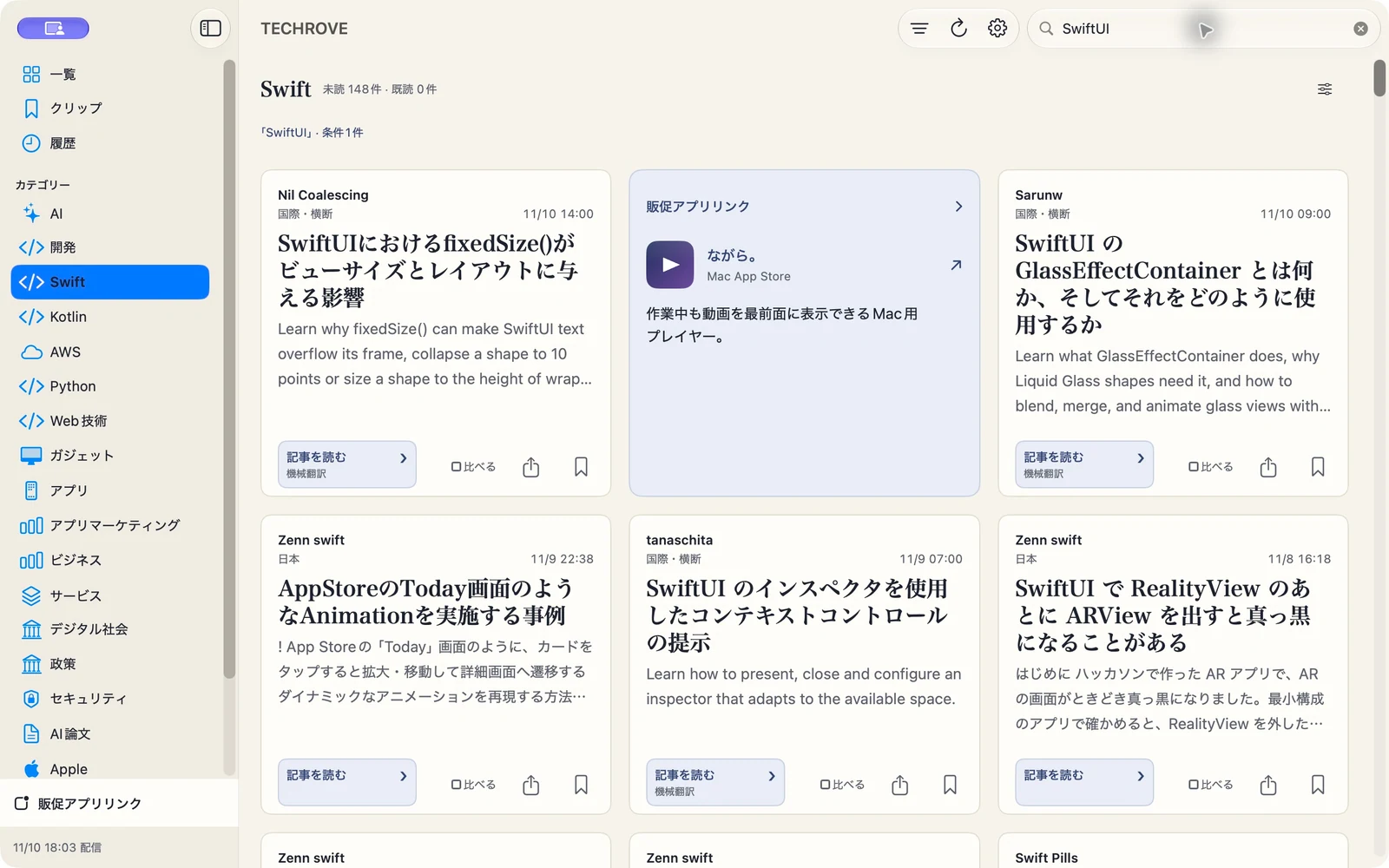
    TECHROVE on Mac, showing the sidebar and search results as cards.

    Mac: search with your keyboard and a wider view

    View larger image

    Screens captured from a development build. Articles and counts change over time. The interface shown is Japanese.

    On the Duo's wide screen
    Search.read.

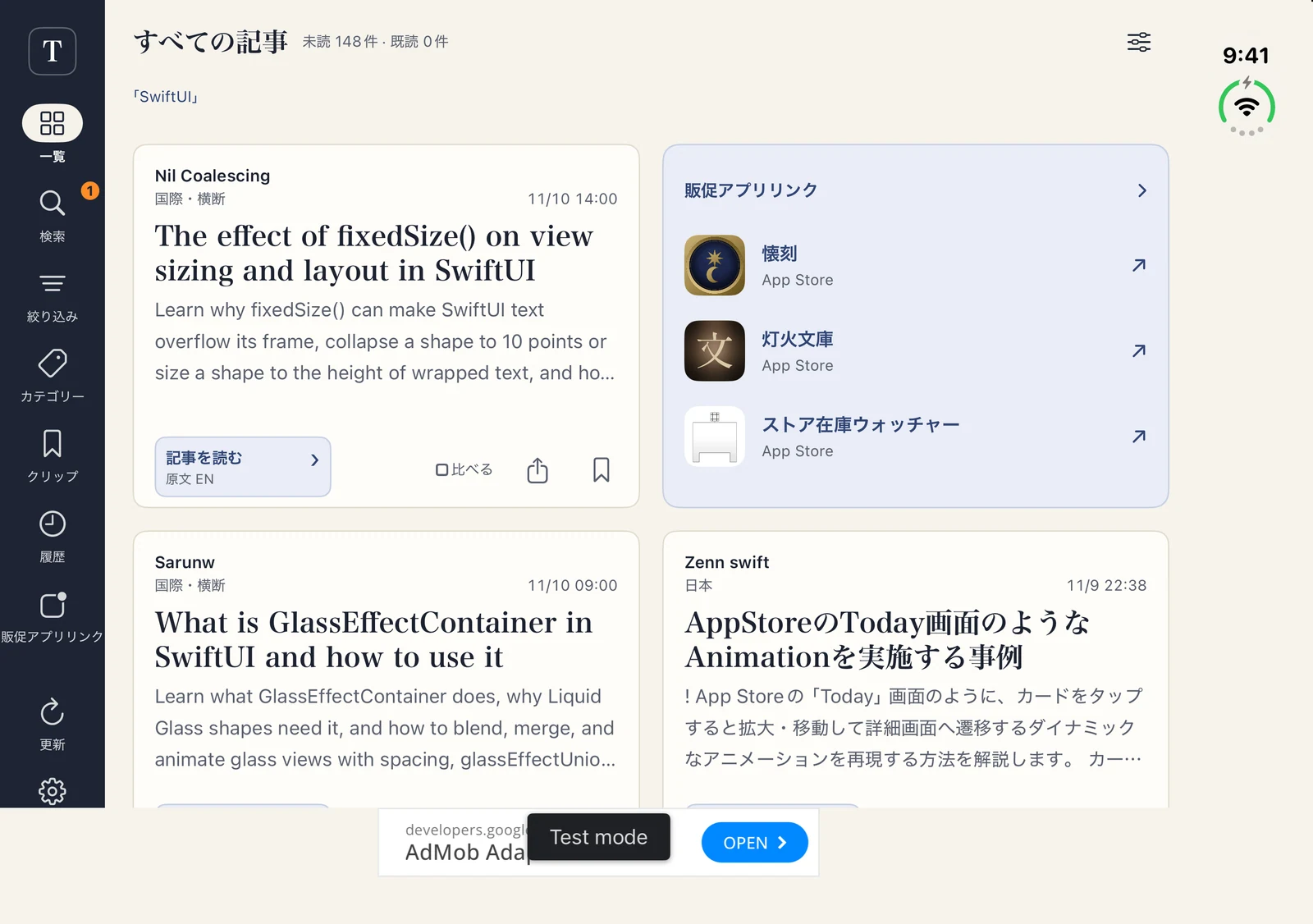
    Search, filters and categories live in a vertical toolbar, leaving the full height for your article list.

    More room for articles. Controls on the left.

    Explore the layouts for iPhone, Duo and Mac. Tap an image to view it at full size.

    The TECHROVE Duo layout, with a vertical toolbar on the left and more room for articles.
    View larger imageCaptured in a simulator using a development build. This does not guarantee appearance or behavior on a physical device.

    Articles in languages you don't know.
    You can choose from the headings.

    When it comes to overseas tech information, it takes a lot of time just to find out where and what is available. TECHROVE is a tool that helps you find, choose, and leave information in less time.

    Headings are in the language selected in your device

    The title in the supported language will be automatically translated into the language selected on the receiving device.You can quickly switch to displaying the original text.

    Add conditions to only read the articles you want

    You can narrow down your search by combining countries/regions, fields, languages, media, and time periods. Articles that match any of the same items will be displayed, and articles that match all of the items will be displayed when you cross multiple items.

    Improve your search to get the information you need

    Tune your search with multiple keywords, phrase matches, and negative terms.You can also select search targets such as title and abstract.You can save frequently used search conditions and use them to collect information next time.

    Example of search conditions
    Keyword
    Swift
    excluded word
    Recruitment
    Search target
    Title/Abstract

    Translate abstract with button, full text with source

    Translate article abstracts when you want to read them with the touch of a button.To continue reading, open the source site and read the original article.

    Clip and share with attribution

    You can clip articles that interest you and read them later. When sharing, you can attach the source and send it as a message or memo using the sharing function on your device.

    Look outside the English-speaking world

    In addition to Western media, we also target sources in China (such as Tencent), the Middle East, Africa, and Asia. You can search for company announcements, service movements, and research papers in one list.

    Field
    AIMobile developmentSwiftKotlingadgetCompanies/ServicesBusinessResearch paper
    Region example
    ChinaMiddle EastAfricaAsiaEuropeAmericas

    Official guide to find what you're looking for.

    Make full use of search to easily collect the next information. We have summarized specific operations and how to check when you have a problem.

    How to find overseas tech news

    Combine keywords by narrowing down countries/regions, fields, and time periods. We will explain AND/OR search, phrase matching, and excluded words with examples.

    Read how to find news

    How to save search conditions

    Name frequently used conditions and recall them next time. You can check the save/organize procedure and the difference between search history and clips.

    Read how to save conditions

    See a list of how to use TECHROVE

    The first step is to start with the language you are interested in.

    Once you have installed the app, please select the country or field of interest.Translation of the title is done within the terminal.

    1. Prepare language for translation

      You can add the required language data from settings.A Wi-Fi connection is recommended for downloading.You can also start reading the original text without adding anything.

    2. Search by country and field

      Update the list of articles and narrow them down by region, field, or keyword. Prepared titles in supported languages will be automatically translated into the selected language.

    3. Open article of interest

      Check the content in the abstract, and if you want to know more, go to the source site. You can clip articles you want to read later, and share articles you want to tell someone about.

    The abstract will be translated when you open the article and click "Translate Content."Unprepared/unsupported languages ​​and titles for which translation has failed will be displayed in their original text.

    Machine translations may contain errors. Please check the original text and sources for accuracy.

    Supported languages
    You can search by the heading of the selected language. The original languages of the articles are various, such as English, Chinese, and Korean. The languages that can be translated vary depending on the OS and device, and you can check it in the "Translation language" in the settings.It is necessary to prepare the corresponding language data.
    Readable content and distribution range
    The app displays headlines and abstracts of articles from selected sources. It does not cover all the world's news, nor does it provide full-text translations or access to paid articles.
    About communication and storage
    Communication is required to obtain new articles and view source sites.Clips save headlines, abstracts, and source links on your device.The current published version does not support clip synchronization between devices.

    Start reading for free
    You can also choose no ads.

    Basic functions such as finding, translating, and clipping articles are available for free on iPhone, iPad, and Android.

    Free to use

    0yen

    First of all, please try adding TECHROVE to your usual information gathering.

    • Search/narrow down and view source articles
    • In-device translation of titles and abstracts
    • Sharing clips and source links
    • Ads displayed
    See compatible devices and download locations

    Ad-free plan

    Monthly 100Yen (tax included/Japan)

    For those who want to read on an ad-free screen. You can apply from the in-app settings.

    • Hide ads during contract
    • Monthly auto-renewing subscription
    • Restore purchases and manage contracts from app settings
    • You can still use the paid period even after cancellation
    Check the terms of use and contract conditions

    The above information is for iPhone, iPad, and Android.Prices and conditions of availability may vary depending on region and store.Please check the store display at the time of purchase.The price and content of the Mac version isMac App StorePlease check.

    Supported devices and delivery status

    Check the latest compatible environments and distribution status in the store to match your device.

    App name
    TECHROVE
    Developer
    Cavemen.jp Co., Ltd.
    Usage
    Discover, search, translate, and clip overseas tech news and AI research papers
    Register
    No account registration required
    Fees
    Free with ads on iPhone, iPad, and Android.Ad-free plan is 100 yen per month (tax included, Japan).Please check the store for Mac requirements.

    If you have any questions about the delivery status or how to use it, please contact us.Support pagePlease see.

    Frequently Asked Questions

    Where can I download it?

    Android versionGoogle Play, iPhone/iPad versionApp StorePlease use the Mac versionMac App StoreYou can check compatible models and the latest distribution status.

    Do I need to register for an account or sign up for a paid contract?

    Account registration is not required. You can use it for free with ads on iPhone, iPad, and Android. The 100 yen per month (tax included, Japan) plan that hides ads is optional. For more informationFees informationPlease see.

    Do I have to enter search criteria each time?

    You can save and recall frequently used search conditions. You can use AND/OR of multiple keywords, phrase matching, negative words, and specifying search targets in combination with narrowing down by country/region or period.How to save search conditionsWe are providing step-by-step instructions.

    Can it be used in places where there is no communication?

    Communication is required to retrieve new articles, download language data, and view source sites.The title, abstract, and source link of the clip will be saved on this device.This is not a function to download the full text of the original article.

    Will the clips be synced to other devices?

    Clips are used on the device where they are saved, and the current published version does not support synchronization between devices.When passing an article to another device or person, you can send the source link using the share function.

    Can you read all the news from around the world?

    No.TECHROVE is a gateway to technology articles collected from selected sources.It does not cover all articles in the world.

    Which language title would you like to use in your chosen language?

    Translates titles in languages supported by the device's translation function into the selected language. If it is your first language, you may need to download language data, so we recommend a Wi-Fi connection. Unsupported languages or titles that cannot be translated will be displayed in their original text.

    Can I read the full text of the article within the app?

    The app displays the heading and abstract. The abstract can be translated with a button. Please open the source site to read the full text.

    How often are articles updated?

    Check the published distribution data when starting or redisplaying the app. You can also use manual 'refresh'.The new articles that can be retrieved vary depending on the distribution process and the update status of each source.

    What if I want to recommend an article to someone?

    You can use your device's share function to send the article along with the source from the share button.It is convenient to clip articles that you want to read later.

    I would like to know how personal information is handled.

    Privacy PolicyPlease check.

    I would like to contact you about a problem or article publication.

    info@cavemen.jp Please contact us. If there is a problem, please include the device name, OS version, and the operation at the time of occurrence so that we can check quickly. Please do not send confidential information such as passwords.

    Another tool for life and work.

    App promotions

    AddressPrint

    Postcard addresses, from the contacts you already use.

    Adjust text, position and spacing directly on the postcard.

    Explore AddressPrint

    Let's start with the country you're interested in.

    Try adding global sources to your usual themes.

    English